Meta Ads Manager: results for each image, video and text
Meta Ads Manager can show results for each image and video in an ad, through Breakdown, then Creative, then Media. Text variations have their own breakdown under Dynamic creative element. Ads Manager labels these values as estimated, and Meta says the feature may not be available to every account yet.
| Platform | Meta Ads |
|---|---|
| Feature | Individual media asset reporting in Meta Ads Manager |
| Announced | Not confirmed |
| Status | Rolling out |
| Where available | Meta’s help page says the feature may not be available to every account at this time. The page is undated and names no markets. |
| Who is affected | Advertisers using multi-media ads or several text variations in one ad, and anyone judging creative performance in Ads Manager. |
| Action needed | Optional. Use Breakdown in Ads Manager to review each asset before replacing or adding creative. |
| Sources | Meta Business Help Centre: View creative performance for individual media assets in your ad · Meta Business Help Centre: What's new in placement settings in Meta Ads Manager |
What changed
A single Meta ad can now hold several creatives. Meta’s placement settings page describes multi-media ads with up to ten images and videos in one ad. That creates an obvious question: which of the ten is doing the work? Meta’s help page describes three views from the Breakdown menu in Ads Manager:
- Each image or video: Breakdown, then Creative, then Media. Results appear for each asset you uploaded.
- Each text variation: Breakdown, then Dynamic creative element, then one of the available text options.
- Media you removed: Breakdown, then Ad delivery. We could not find an option with that name in the Ads Manager account we checked; the menu there has a Delivery submenu instead.
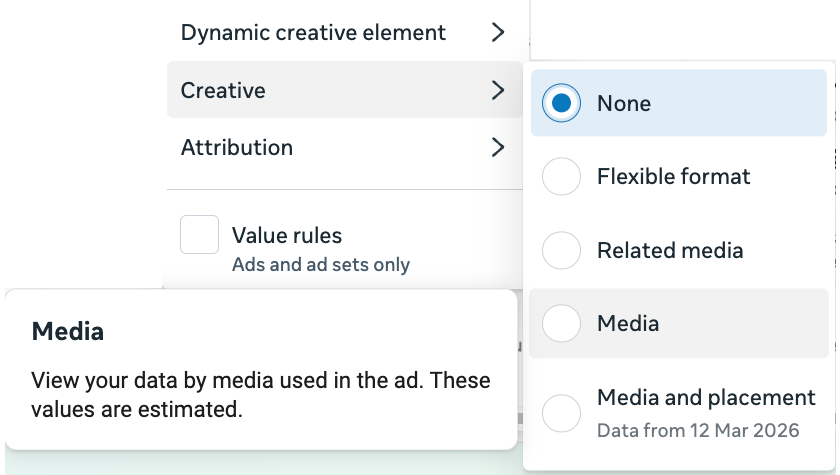
The menu in Ads Manager adds details the help page leaves out. Under Creative, the options are Flexible format, Related media, Media, and Media and placement, the last marked “Data from 12 Mar 2026”. Under Dynamic creative element, the options we saw include Image, video and slideshow, Text, Headline, Description, Call to action and Website URL. The tooltip on Media says “These values are estimated”. The tooltip on Text says the same and adds: “For offsite conversion metrics, this breakdown is in development.”
There are limits. The Media breakdown reports images and videos delivered as single media. If an ad also uses format display options, meaning you selected Show as collection or Show as carousel, those formats do not appear in this breakdown.
Meta says most reporting breakdowns are available, except custom conversions and these results: Donate, Contact, Start trial, Submit application, Subscribe, Schedule, Customize product and Find location.
Why it matters
Until you can see assets separately, an ad with several creatives is a black box: it either works or it does not. This view is what makes multi-media ads usable, and it matters more now that Meta is removing manual placements for Sales, Leads and App promotion campaigns and pushing advertisers to give one ad several assets. It also pairs with the Creative diversity column: that column scores how different your assets are, and this breakdown shows how each one performed.
The trap is reading it like an A/B test. Meta labels these numbers as estimated, and its delivery system decides how much each asset is shown, so one asset can have weak results because it barely delivered, and another can look strong on a small number of conversions. Our view: use this to find assets to replace, not to declare winners, and look at spend and delivery next to results before removing anything. Advertisers optimising for subscriptions, applications or contacts should check the list of unsupported results first, because their main result may not appear here. If you judge ads on website purchases, note that the Text breakdown’s offsite conversion metrics are still marked as in development.
What to do
- In Ads Manager, open an ad with several images or videos, click Breakdown, then Creative, and select Media. Compare spend alongside results for each asset.
- Check whether your main result is on Meta’s unsupported list, or is a custom conversion. If it is, this breakdown will not show it.
- Repeat with Breakdown, then Dynamic creative element, to compare text variations.
- For placement questions, try Breakdown, then Creative, then Media and placement. Ads Manager marks it as having data from 12 March 2026, so it will not cover older periods.
- If the ad uses Show as carousel or Show as collection, remember those formats are missing from the Media view and judge them separately.
Still unknown
Meta’s page has no date and does not say when the feature launched, how widely it is available or how it decides which asset to show. It does not explain how the estimates are made, why the Ad delivery option it describes was not in the account we checked, whether results can be exported or how the numbers relate to the ad-level total when other formats are in use. Treat comparisons between assets as directional, not as a controlled test.
Frequently asked questions
How do I see results for each image or video in a Meta ad?
In Ads Manager, click Breakdown, then Creative, and select Media. Results are broken down by each asset you uploaded. Meta says the feature may not be available to every account.
How do I see which ad text works best in Meta Ads Manager?
Click Breakdown, then Dynamic creative element, and choose from the available text options.
Can I see results for media I removed from a Meta ad?
Meta’s help page says to click Breakdown, then Ad delivery. We could not find an option with that name in the Ads Manager account we checked, which has a Delivery submenu instead, so it may not be available to every account.
What does Meta’s media breakdown leave out?
Custom conversions and results for Donate, Contact, Start trial, Submit application, Subscribe, Schedule, Customize product and Find location. Reporting for images and videos shown as a carousel or collection is also not included.
Official sources
- Meta Business Help Centre: View creative performance for individual media assets in your ad ↗
- Meta Business Help Centre: What's new in placement settings in Meta Ads Manager ↗
Related coverage
- Meta Ads placements: no manual choice for Sales, Leads, Apps
- Meta Pixel: conversions measured on customer devices
- Meta Ads Manager Creative diversity column: how to read it
Update history
- — First coverage, from Meta’s help page and a check in Ads Manager, with Piyush’s screenshot. The page is undated, so no launch date is given.
Suggested checks are editorial guidance, not platform requirements. Every claim links to its official source. Report a correction →