Google Analytics Data Manager: avoid double conversions
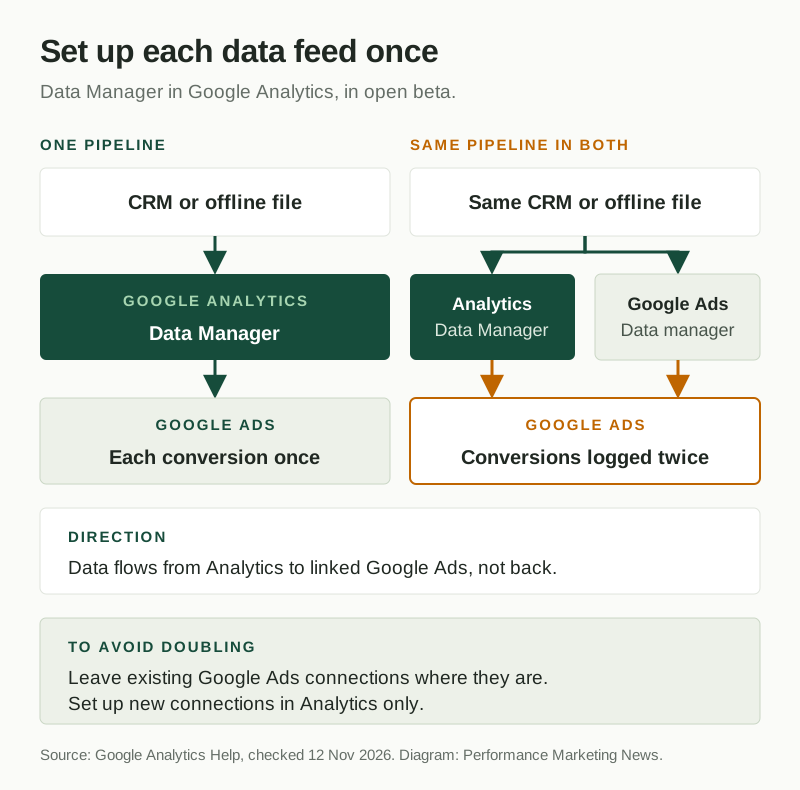
Data Manager, Google’s tool for connecting first-party data such as CRM records and offline files, is now part of Google Analytics as an open beta. Google recommends using it for future connections, and warns that activating the same data pipeline in both Analytics and Google Ads “can log conversions twice”. Data flows from Analytics to linked Google Ads accounts, not the other way round.
| Platform | Google Ads |
|---|---|
| Feature | Data Manager in Google Analytics |
| Announced | Not confirmed |
| Status | Beta |
| Where available | Open beta, described on Google Analytics Help. Google gives no start date and does not say whether every property has it. It was not yet visible in the Analytics account we checked on 12 November 2026. Not supported on subproperties or roll-up properties. |
| Who is affected | Advertisers who connect CRM data, offline files or Google Ads links to Google Analytics or Google Ads, and anyone importing Analytics data into Google Ads. |
| Action needed | Recommended. Keep each data connection in one place: leave existing Google Ads connections where they are and add new ones in Analytics only. |
| Sources | Google Analytics Help: About Data Manager in Google Analytics (beta) |
What changed
Google’s help page describes Data Manager in Google Analytics as “a centralized data management tool, which lets you manage your data streams and connected products” from one place, with a data connection map that shows how data moves from sources to the property and on to destinations. Sources include “a customer relationship management (CRM) platform, a Google Ads product link or even an offline file.”
Three details matter for advertisers:
- Direction: data ingested in Analytics flows to linked Google Ads and Google Marketing Platform accounts, “but not the other way around.”
- Recommendation: “It is recommended to use Data Manager in Google Analytics for any future connections.”
- Warning: “Don’t activate an identical data pipeline in both interfaces together, as this can log conversions twice.”
It sits in Admin, in the left-hand menu under My preferences. Google says the feature “is part of an open beta and is subject to change,” requires the appropriate permissions, and is not supported on subproperties or roll-up properties. It was not yet visible in the Analytics account we checked on 12 November 2026.
Why it matters
Many advertisers already connected first-party data in Google Ads’ own Data Manager, for offline conversions or enhanced conversions. Repeating the same connection in Analytics sends the same conversions to Google Ads twice. Reported conversions rise, CPA looks better, and Smart Bidding learns from numbers that are not real, which is the hardest part to undo.
Our view: this is a useful consolidation, one place to bring CRM and offline data in and pass it to Google Ads. The risk is entirely in the setup. Pick one home for each data feed, and treat any sudden jump in Google Ads conversions after a Data Manager change as a duplicate until you have proved otherwise.
What to do
- Before adding anything in Analytics, list the data connections you already have in Google Ads under Tools › Data manager.
- Leave those existing connections where they are, and set up only new connections in Data Manager in Google Analytics.
- When it reaches your property, open the data connection map and check that no feed appears in both places.
- For a week after any change, compare Google Ads conversions with your own orders or CRM leads to spot doubling.
Still unknown
Google has not said when the beta started, when it leaves beta, which roles can see it, or whether every property has it. It does not say whether Google Ads will warn you about a duplicate connection. Our related brief on Data Strength Uplift covers what Google reports once first-party data is connected.
Frequently asked questions
What is Data Manager in Google Analytics?
A centralised tool in Google Analytics for managing data streams and connected products, with a map of how data moves from sources to the property and on to destinations. Google lists sources such as a CRM platform, a Google Ads product link or an offline file. It is in open beta.
Can Data Manager count Google Ads conversions twice?
Yes, if the same pipeline is set up twice. Google warns: “Don’t activate an identical data pipeline in both interfaces together, as this can log conversions twice.”
Where is Data Manager in Google Analytics?
In Admin, in the left-hand menu under My preferences. You need the appropriate permissions for the property, and subproperties and roll-up properties do not support it.
Official sources
Related coverage
- Google Ads language targeting removed from Search campaigns
- Google Performance Max may filter out brand searches
- Google ads in AI Mode: now in India and nine more markets
Update history
- — First coverage, from Google Analytics Help. Includes Piyush’s take.
Suggested checks are editorial guidance, not platform requirements. Every claim links to its official source. Report a correction →