Google Performance Max may filter out brand searches
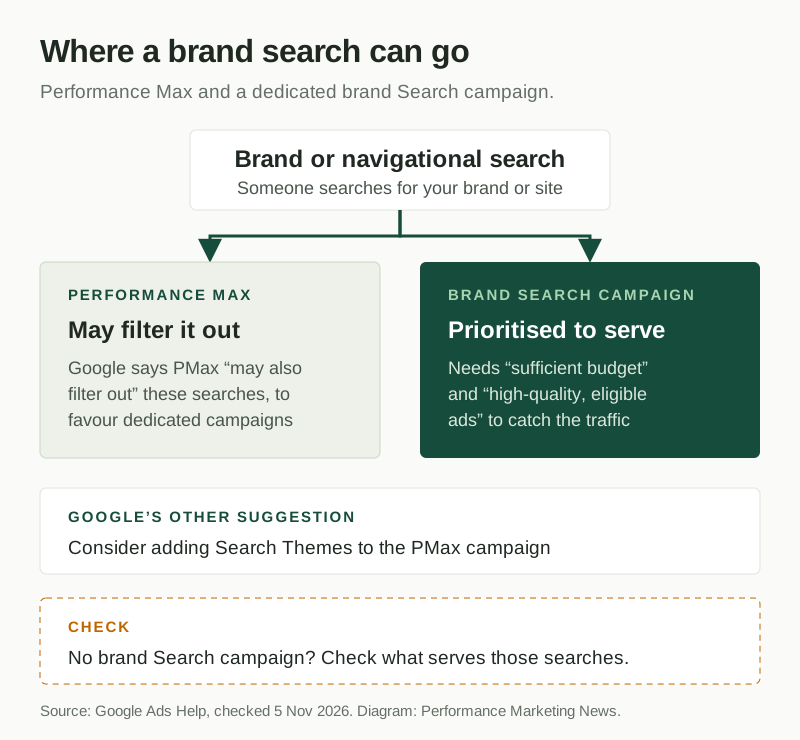
Google’s help page says Performance Max “may also filter out navigational or brand-specific search queries” so that dedicated Search campaigns serve them. To capture this traffic, Google advises giving brand Search campaigns sufficient budget and high-quality, eligible ads, and considering Search Themes in the Performance Max campaign.
| Platform | Google Ads |
|---|---|
| Feature | Performance Max brand and navigational queries |
| Announced | Not confirmed |
| Status | Availability not confirmed |
| Where available | Described on Google Ads Help, on an undated page, with no list of affected accounts or markets. Google says Performance Max “may” filter these searches. Start date not confirmed. |
| Who is affected | Advertisers running Performance Max alongside brand Search campaigns, and advertisers running Performance Max with no dedicated brand Search campaign. |
| Action needed | Recommended. Check that a brand Search campaign exists with enough budget and eligible ads, and review Performance Max search terms for brand queries. |
| Sources | Google Ads Help: How Performance Max interacts with other campaigns in your account · Google Ads Help: About brand settings for Search and Performance Max · Google Ads Help: Unlock more visibility and control in Performance Max |
What changed
Performance Max is Google’s campaign type that runs one budget across Search, Shopping, YouTube, Display and other inventory. A navigational or brand search is someone looking for a specific company or website, such as your brand name.
The relevant passage is on Google’s help page about how Performance Max interacts with other campaigns. It says Performance Max may filter out these searches “to prioritize serving them through dedicated Search campaigns”. It then gives two instructions: “ensure your dedicated brand Search campaigns have sufficient budget and high-quality, eligible ads”, and “consider adding Search Themes to the Performance Max campaign”.
The same page also states the rule for keywords: a Search keyword that exactly matches a query, including after spell correction, is preferred over Performance Max. If no keyword matches exactly, the higher Ad Rank serves.
Brand exclusions remain the separate control for keeping a campaign off a brand. Google’s brand settings page says a campaign with an exclusion “won’t serve for queries associated with a brand that you want to avoid”, and that for Performance Max they apply to Search and Shopping inventory. The two work in different directions: an exclusion is your choice, while this filtering is Google’s.
The help page has no date, so this brief does not say when the wording appeared or claim that Google’s behaviour changed on a particular day.
Why it matters
This matters most to advertisers who dropped their brand Search campaign because Performance Max was picking up brand searches anyway. If Performance Max steps back from some of those searches, a competitor bidding on your name could be the only ad showing. The cost shows up as lost brand clicks, which are usually among the cheapest conversions in an account.
The opposite also holds. Advertisers who run a brand Search campaign to keep brand traffic out of Performance Max results should find Google’s wording helpful, but “may” is not a guarantee, so it does not replace brand exclusions. Our view: run a small, always-funded brand Search campaign next to Performance Max, and treat this as a reason to check your setup rather than as a new control you can rely on. Advertisers who do not run Performance Max can ignore this.
What to do
- Check whether each account running Performance Max also has a dedicated brand Search campaign. If not, create one with exact match brand keywords, which Google says are preferred over Performance Max.
- Review that campaign’s budget and ad status. Google’s wording is specific: sufficient budget and high-quality, eligible ads. A campaign limited by budget or with disapproved ads leaves brand searches uncovered.
- Open search terms reporting for your Performance Max campaigns and look for brand queries, so you know how much brand traffic it is still taking.
- Decide whether to add Search Themes to the Performance Max campaign, as Google suggests, for the brand-adjacent searches you want it to reach.
- If you want Performance Max off your brand entirely, apply a brand exclusion rather than relying on this filtering.
Still unknown
Google does not say when this wording was added, how often Performance Max filters these searches, which accounts or markets it applies to, or whether it happens when no dedicated brand Search campaign exists. It also does not explain how adding Search Themes affects brand searches. We have not measured the effect in an account; the search terms check above is how we would start.
Frequently asked questions
Does Performance Max show ads on brand searches?
It can, but Google’s help page says Performance Max may also filter out navigational or brand-specific searches, to prioritise serving them through dedicated Search campaigns. Google does not say how often this happens.
Do I need a separate brand Search campaign with Performance Max?
Google advises making sure dedicated brand Search campaigns have sufficient budget and high-quality, eligible ads to capture this traffic. It also suggests considering Search Themes in the Performance Max campaign.
How do I stop Performance Max showing on my brand terms?
Use brand exclusions, which stop a campaign serving on queries associated with a brand you want to avoid. For Performance Max, Google says they apply to Search and Shopping inventory.
Official sources
- Google Ads Help: How Performance Max interacts with other campaigns in your account ↗
- Google Ads Help: About brand settings for Search and Performance Max ↗
- Google Ads Help: Unlock more visibility and control in Performance Max ↗ · Aug 7, 2025
Related coverage
- Google ads in AI Mode: now in India and nine more markets
- Google Ads Financial Services Verification: US and Canada
- Google Ads channel prioritization and budget caps: what changes
Update history
- — First coverage, from Google Ads Help. The page is undated, so no start date is given.
Suggested checks are editorial guidance, not platform requirements. Every claim links to its official source. Report a correction →