Google Asset Studio: free Gemini Omni video ads
Google Ads can now make video ads for you inside Asset Studio, using Gemini Omni, Google DeepMind’s multimodal model. You give it your website URL, brand guidelines, product photos, existing ads or a short brief; it proposes three storyboards, you edit the one you like scene by scene, and you export the video to Demand Gen, Performance Max or other YouTube campaigns. Google says it is rolling out globally as a free feature.
| Platform | Google Ads |
|---|---|
| Feature | Asset Studio video creation with Gemini Omni |
| Announced | Jun 15, 2026 |
| Status | Rolling out |
| Where available | Rolling out globally as a free feature inside Google Ads. Google’s announcement page was first published on 15 June 2026 and updated on 29 September; a 28 September Q&A repeats that it is rolling out globally. Google gives no languages, eligibility rules or completion date. |
| Who is affected | Advertisers running Demand Gen, Performance Max or other YouTube and Google campaigns who need video assets, especially those without a video team or budget. |
| Action needed | Optional. Upload brand guidelines in Asset Studio first, then generate a video from your best static ad and test it as an added asset rather than a replacement. |
| Sources | Google Ads (Think with Google Accelerate): From brief to on-brand video in Asset Studio: Meet Gemini Omni in Google Ads · Google Ads (Think with Google Accelerate): Inside Drop #1: Your top questions on Gemini Omni in Asset Studio answered · Google Ads Help: About Asset studio |
What changed
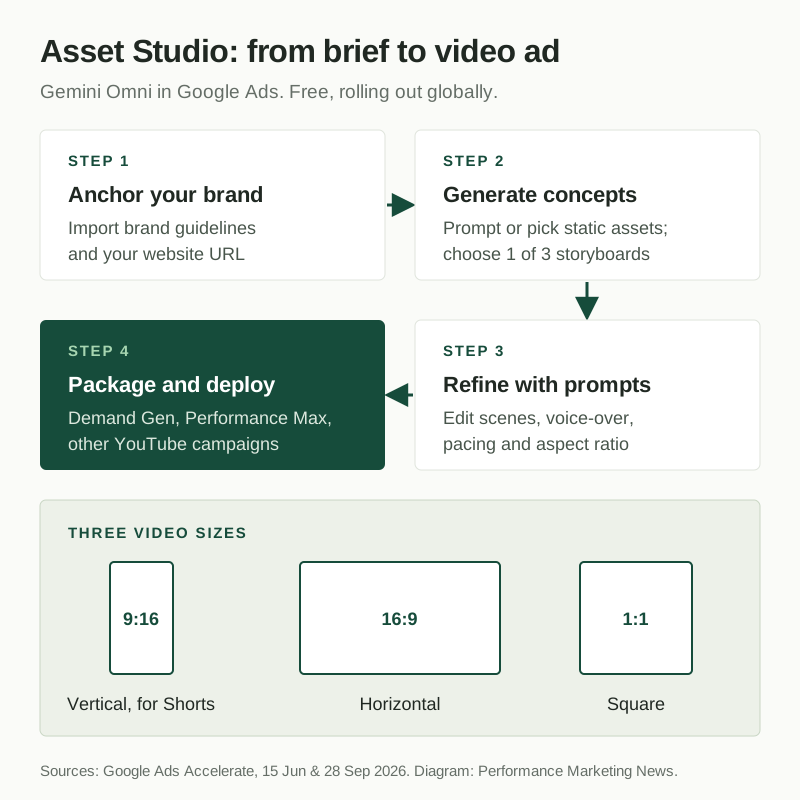
Asset Studio is the creative workspace inside Google Ads where you create, edit and store ad assets. It already had a template video builder, trimming and voice-over tools. Gemini Omni replaces template-filling with a brief-to-video workflow. Google’s announcement describes four steps:
- Anchor your brand. Import brand guidelines and your URL. Google says Omni follows fonts, hex codes, logo rules and visual style, and the guidelines can be several files rather than one PDF.
- Generate concepts. Enter a prompt or pick existing static assets. Omni also accepts product shots and video clips as references.
- Refine with prompts. Change scenes, backgrounds, styling, voice-overs, pacing and aspect ratio in plain language. Each instruction builds on the last.
- Package and deploy. Export to Demand Gen, Performance Max or other YouTube and Google campaigns, download the file, or save it to your YouTube channel.
Google’s 28 September Q&A with Asset Studio’s product manager adds the details. You choose one of three creative narratives before editing the storyboard. Videos follow YouTube’s ABCD creative framework (attract, brand, connect, direct). Sizes are vertical 9:16 for Shorts, horizontal 16:9 and square 1:1. Generated assets carry SynthID, Google’s invisible watermark for AI-made content. Google’s advice is to give it plenty of reference material: four or five real product shots from different angles, backdrops you want the output to resemble, and current logos and colours.
Google’s one statistic is that over half of small and medium businesses on Google Ads now use Google AI to create or optimise creative, from its internal data for January to June 2026. It gives no performance claim for Omni videos.
Why it matters
Demand Gen and Performance Max both reward video, and video is the asset small advertisers most often skip because it costs the most to make. In Performance Max, Google has long been able to build an auto-generated video from your images when you supply none, and you had little say over the result. Omni puts that generation in your hands: you choose the narrative, edit each scene and approve the final cut. For a small business with good product photos and no editor, that is the difference between running Demand Gen with images only and running it with a vertical video for Shorts.
Our view: treat Omni videos as cheap test variants, not finished brand films. The real gain is volume. You can try three hooks for the cost of one brief, keep whichever wins, and reshoot properly once you know what works. The risk is sameness. If every advertiser in a category feeds the same tool the same kind of product photos, the ads will start to look alike. Strong reference material and a specific brief are what keep yours distinct, and that work still sits with the marketer.
What to do
- In Google Ads, open Asset Studio and upload your current brand guidelines, logos and four or five product photos from different angles before generating anything.
- Generate a video from your best-performing static image ad. Write a brief that names the product, the offer and the tone, and edit the storyboard until the first scene shows the product or the problem within the first seconds.
- Make both vertical 9:16 and horizontal 16:9 versions, and add them to one Demand Gen or Performance Max asset group alongside your existing assets, not in place of them.
- After two to three weeks, compare the asset group’s results before and after the video was added. Keep or replace the video based on conversions, not views.
- Check every generated scene for product accuracy, prices and claims before saving. The video runs under your name, whichever model made it.
Still unknown
Google says Omni is rolling out globally but gives no languages, no countries in order, no date by which all accounts will have it, and no eligibility rules. It does not say how long videos can be, whether restricted categories such as finance or health are excluded, or how generated videos are reviewed for policy. Google’s help page for Asset Studio does not yet describe Omni. The announcement page shows no visible date; 15 June 2026 is its published date in Google’s page data. The SMB figure is Google’s internal data.
Frequently asked questions
Can Google Ads create video ads from images?
Yes. With Gemini Omni in Asset Studio you select images, such as those from existing ads, choose an aspect ratio and describe the video. Google returns three creative narratives, and you edit the chosen storyboard scene by scene before rendering.
Is Gemini Omni in Google Ads free?
Yes. Google says the Gemini Omni video features are rolling out globally as a free feature inside Google Ads.
Which campaigns can use Asset Studio videos made with Gemini Omni?
Google says you can export them to Demand Gen, Performance Max and other YouTube or Google campaigns, or download them or save them to your YouTube channel.
Which video sizes does Gemini Omni create in Google Ads?
Vertical 9:16 for Shorts, horizontal 16:9 and square 1:1, according to Google’s 28 September Asset Studio Q&A.
Official sources
- Google Ads (Think with Google Accelerate): From brief to on-brand video in Asset Studio: Meet Gemini Omni in Google Ads ↗ · Jun 15, 2026
- Google Ads (Think with Google Accelerate): Inside Drop #1: Your top questions on Gemini Omni in Asset Studio answered ↗ · Sep 28, 2026
- Google Ads Help: About Asset studio ↗
Related coverage
- Google ads in AI Mode: now in India and nine more markets
- Google Ads Financial Services Verification: US and Canada
- Google Ads channel prioritization and budget caps: what changes
Update history
- — Added Piyush’s take.
- — First coverage, from Google’s Gemini Omni announcement page (first published 15 June 2026, updated 29 September) and its 28 September Asset Studio Q&A, checked on 24 October.
Suggested checks are editorial guidance, not platform requirements. Every claim links to its official source. Report a correction →